
Woodworking is a craft that has been practiced for centuries, and with the advancements in technology, it has become even more accessible and precise. Two popular tools used in woodworking today are the CNC router and the laser cutter. Both of these machines offer unique capabilities and advantages, but choosing the right one for your woodworking projects can be a daunting task. In this blog post, we will explore the features and benefits of each machine to help you make an informed decision.
1. CNC Router for Woodworking
A wood CNC router is a computer-controlled cutting machine that uses a rotating tool to carve out intricate designs on various materials, including wood.
A CNC router is controlled by a computer to move cutting tools. It can perform engraving, cutting, drilling, slotting, and 3D machining. It is mainly used to process wood, metal, acrylic, and other composite materials.
It works by following a pre-set tool path and using different cutting tools for different processes. The cutting tool removes material from the workpiece to create the desired shape. Depending on the number of axes and tools used, a CNC router can handle both 2D cutting and 3D carving, making it highly flexible for different machining needs.
Features
- Multi-Axis Machining
CNC routers commonly come in 3-, 4-, and 5-axis models. A 3-axis router uses the X, Y, and Z axes for basic flat cutting and shallow 3D carving. 4- and 5-axis routers can handle more complex work, such as curved surfaces, with fewer tool changes. They can also complete multiple machining processes in one setup.
- Multiple Tool Options
CNC routers can use different cutting tools, such as end mills, ball nose bits, and V-bit engraving tools. Different tools are used for cutting, engraving, slotting, and other machining tasks.
- Large Working Area
A CNC router can have a large working area, allowing you to process large sheets in one setup, such as for advertising wooden signs. It can also process multiple small parts at once, improving efficiency and reducing material waste.
- Suitable for Thick Materials
A CNC router can process thick materials by making multiple passes with the cutting tool.
Types
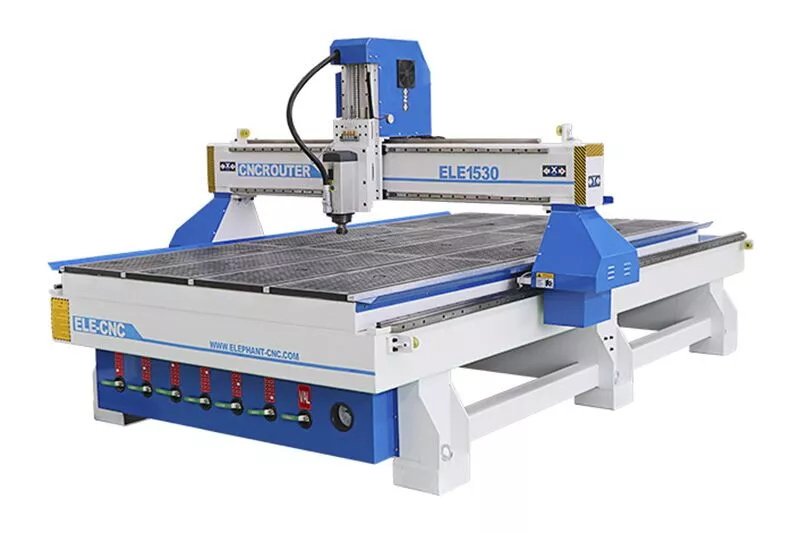
3 axis wood cutting CNC machine
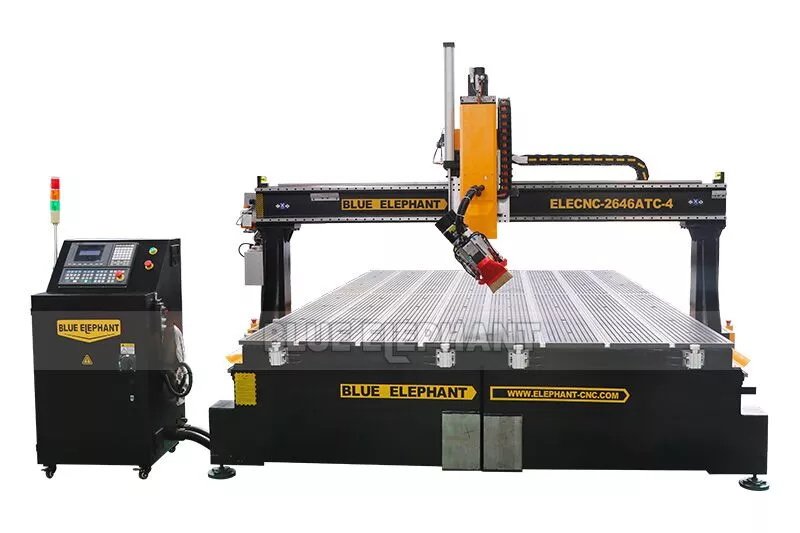
4 axis wood cutting and engraving machine


Parameters
| X,Y axis travel | option: 1300*2500mm; 1500*3000mm, 2000*3000mm; 2000*4000mm, 2600x4600mm, etc. |
| Z axis travel | option: 400mm, 500mm, 600mm, etc. |
| Spindle type | air cooling spindle/ water cooling spindle |
| Rotary device | Optional |
| Tool magazine | Linear/ Carousel type auto tool changer |
| Tool holder with collect | φ4, φ6, 1/8, 1/2 |
| Control system | Taiwan Syntec controller, option:Taiwan LNC |
| Driving system | 1300W Leadshine servo motor and servo drivers. option: Japan Yaskawa servo |
| Reducer | Japan SHIMPO reducer |
| Machine structure | Heavy duty body with quenching treatment |
| Work table | Aluminum T-slot worktable; Full vacuum worktable; Vacuum & T-slot worktable |
| Positioning cylinder | Optional: 7pieces (X2, Y3) |
| Linear guide | Taiwan linear guide |
| Transmission | Taiwan / Germany Helical Rack and Pinion Taiwan TBI high precision ball screw |
| Lubrication system | 1.5L automatic lubrication system/Manual lubrication system |
| Cables | Germany Igus cables with CE, cUL certificate |
| Compatible software | Artcam, Alphcam, Type 3, Ucancam, Aspire, etc |
| Command language | G Code & M Code |
| Working voltage | 220V 1PH/3PH; 50HZ/60HZ 380V 3PH 50HZ/ 60HZ |
Advantages
- One of the key advantages of a CNC router is its precision. It can create intricate cuts and shapes with incredible accuracy, allowing you to achieve detailed and complex designs that would be difficult to replicate by hand.
- Another significant advantage of CNC routers is their versatility. They can handle a wide range of woodworking tasks, from cutting and shaping to carving and engraving. With the right software and tooling, you can create everything from furniture components to decorative items with ease.
- CNC routers also offer the flexibility to work with different types and thicknesses of wood, allowing you to explore various woodworking projects.
Disadvantages
- The cutting tools wear out over time and need to be replaced regularly.
- Machining produces wood chips and dust, so a dust collection system is needed.
- Cutting speed and surface quality depend on the cutting tool, spindle speed, and cutting settings.
- Industrial CNC routers usually require a higher initial investment.
- Compared with other cutting machines, CNC routers generally have a higher upfront cost.
Working video
Price
In the CNC machine market, the wood CNC cutting machine price usually starts from $2,000. However, there is almost no upper limit on the maximum wood cutting machine price. Depending on the type and configuration or brand of the woodworking CNC router machine, the price can be as high as more than $100,000. For example, the small hobby wood CNC machine price ranges $3,000 to $6,000. The 4 axis CNC wood cutting machine has the price range of $14,000 to $20,000. And the automatic tool change wood CNC router price is around $25,000. The 5 axis machining center price can reach $100,000 or even more.
2. Laser Cutter for Woodworking
For wood cutting, CO2 laser cutters are commonly used. They use a high-energy CO2 laser beam to heat, melt, or vaporize the material along a preset path, allowing you to cut, engrave, and mark wood.
Features
- Non-Contact Processing
The laser beam cuts the material without physical contact. This reduces material contamination, eliminates tool wear, and helps prevent thin materials from breaking during processing.
- Excellent Detail
A laser beam can have a diameter of less than 0.1 mm, allowing for precise and detailed processing. It works especially well for complex patterns, text, and fine details.
- Excellent Engraving Capability
Laser cutters are ideal for engraving photos, logos, signs, and decorative patterns.
- High Efficiency for Thin Materials
Laser cutters are highly efficient for thin sheets. They can quickly cut complex patterns, hollow designs, and small parts, making them suitable for personalized products and small-batch production.
- Less Material Waste
Laser cutting produces a very narrow kerf, which helps reduce material waste. Its high precision also allows parts to be arranged more closely together on the material.
Types
Co2 laser cutting machine

Mixed laser cutting machine

Parameters
| Laser type | CO2 laser |
| Laser power | Optional: 100W, 150W, 200W, 300W, etc. |
| Working area | optional: 1300x900mm, 600x400mm, 900x600mm, 1600x1000mm, etc. |
| Worktable | Honeycomb or knife blade |
| Cutting thickness | 0-25mm acrylic (depending on actual cutting conditions) |
| Power supply | 220V, 50/60Hz |
| Cooling system | CW300/CW500/CW5200/CW6000 |
Advantages
When it comes to woodworking, a laser cutter offers some unique advantages.
- One of the standout features of a laser cutter is its speed. It can cut through wood quickly and efficiently, making it an excellent choice for large-scale production or projects with tight deadlines.
- In addition to speed, a laser cutter is highly effective at creating intricate detailing. The laser beam is incredibly precise, allowing you to achieve intricate designs, intricate patterns, and fine engravings. This level of detail is especially beneficial if you’re working on artistic or decorative pieces where precision is crucial.
Disadvantages
- Not suitable for cutting very thick wood or removing large amounts of material.
- Wood edges may become discolored or charred during cutting.
- The cutting process produces smoke, so good ventilation and an exhaust system are needed.
- Whether a material is suitable for laser processing depends on the laser type and the material composition.
- Not suitable for traditional drilling, deep 3D carving, or heavy milling.
Working video
Price
As to say the wood laser cutting machine price, the most entry level wood laser cutter price is about $3,500. But the high end laser cutting machine price or industrial laser cutting machine price will up to $100,000.
3. Difference Between CNC Router and Laser Cutter
| Comparison | CNC Router | Laser Cutter |
| Processing Method | Mechanical cutting tools | Focused laser beam |
| Material Thickness | Best for thick materials | Best for thin and medium materials |
| Engraving | Deep engraving and 3D carving | Fine and detailed engraving |
| Materials | Wood, MDF, plywood, acrylic, plastics, soft metals | Wood, acrylic, fabric, paper, etc. |
| Edge Quality | May require sanding | Smooth edges, but may cause charring |
| Processing Speed | Faster for thick materials | Faster for thin materials |
| Waste | Wood chips and dust | Smoke and fumes |
| Operating Cost | Tool replacement and maintenance | Energy use and laser tube replacement |
CNC routers and laser cutters can both use computer control for automated processing. However, they differ in processing methods, material thickness, engraving capabilities, material range, edge quality, processing speed, waste, and operating costs. The right choice depends on your material thickness, type of work, desired results, and production needs.
Processing Method
A CNC router uses mechanical cutting tools that directly contact the material for physical cutting. A laser cutter uses a focused laser beam to process the material without physical contact.
Material Thickness
CNC routers are better for processing thick materials, while laser cutters are more suitable for thin and medium-thickness materials. For example, a CNC router can easily cut or carve wood boards several inches thick, while a laser cutter can typically handle materials up to about 1/2 inch thick more easily.
Engraving Capability
CNC routers are ideal for deep engraving and 3D carving, while laser cutters are better for fine and detailed engraving.
Material Range
CNC routers can process a wide range of materials, including wood, MDF, plywood, acrylic, plastics, and soft metals. Laser cutters have a more limited material range and are commonly used for wood, acrylic, fabric, and paper.
Cutting Edge Quality
CNC-routed edges may need sanding after cutting. Laser cutters can produce very smooth edges that usually do not need sanding, but the edges may have some charring or discoloration.
Processing Speed
For thicker materials, CNC routers are generally faster. For thinner materials, laser cutters are usually faster than CNC routers.
Processing Waste
CNC routers mainly produce wood chips and dust, while laser cutters mainly produce smoke and fumes.
Operating Costs
CNC routers have cutting tools that wear out and need regular replacement. Other machine parts also require regular maintenance, which can increase maintenance costs. Laser cutters have fewer moving parts, but they generally use more energy and may require regular laser tube replacement.
4. Choose Wood CNC Router or Wood Laser Cutting Machine?
Now that we have explored the features and advantages of both the CNC router and the laser cutter, let’s consider how to choose the right tool for your woodworking projects.
Project Requirements
Assess the specific requirements of your projects. Consider the size, complexity, and intricacy of the designs you intend to create. If you need high precision and versatility, a CNC router might be the better choice. However, if speed and intricate detailing are your priorities, a laser cutter could be the ideal option.
Budget and Cost
Evaluate your budget and the cost of the machines. CNC routers tend to be more expensive compared to laser cutters, so consider your financial constraints before making a decision. Keep in mind that while a CNC cutting machine may have a higher upfront cost, it offers versatility and can handle a wide range of woodworking tasks, potentially providing more value in the long run.
Learning Curve
Consider your familiarity and expertise with the machines. CNC routers generally require some knowledge of CAD/CAM software and woodworking techniques. Laser cutters, on the other hand, may have a slightly steeper learning curve due to the intricacies of laser settings and safety protocols. Assess your willingness to learn and invest time in mastering the machine.
Safety Considerations
Take into account the safety requirements associated with each machine. Both CNC routers and laser cutters have their safety protocols, but laser cutters require extra precautions due to the laser beam. Ensure that you have the necessary safety equipment and knowledge to operate the machine safely.
FAQ
1. Can a CNC Router and Laser Cutter Be Used Together in a Woodworking Business?
Yes. A CNC router is suitable for furniture parts, sheet processing, engraving, and drilling, while a laser cutter is ideal for fine engraving, personalized designs, and decorative patterns. You can use both machines for different production tasks or production lines.
2. What Software Do I Need for a CNC Router or Laser Cutter?
CNC routers usually use CAD/CAM software for product design and toolpath generation, such as JDPaint, ArtCAM, Fusion 360, and Mach3. Laser cutters commonly use design and laser control software, such as LightBurn and LaserGRBL.
3. Can Beginners Learn to Operate a CNC Router or Laser Cutter?
Yes. With training and continued practice, beginners can learn to operate both machines in about one week to several months. Key skills include software operation, file preparation, cutting parameter settings, material positioning, machine operation, and safety procedures.
4. What Safety Precautions Should I Take When Using a CNC Router or Laser Cutter?
Both CNC routers and laser cutters should be used in a well-ventilated area with proper fire safety equipment. For CNC routers, use a suitable dust collection system, secure the workpiece properly, and stay clear of the moving cutting tools. For laser cutters, wear appropriate protective eyewear and maintain good ventilation and fume extraction.
5. Can One CNC Router Handle Different Woodworking Projects?
Yes. By changing the cutting tools and adjusting the machine settings, a CNC router can process furniture panels, custom furniture, wood crafts, cabinet making, wooden doors, advertising signs, decorative items, and other woodworking products.
Word At Last
In the end, the choice between a CNC router and a laser cutter for woodworking depends on your specific needs, project requirements, budget, and expertise. CNC routers offer precision, versatility, and the ability to work with different types of wood, while laser cutters provide speed and intricate detailing for woodworking. Assess your priorities and consider the factors mentioned above to make an informed decision. Remember, both machines have their unique advantages, and choosing the right one will enhance your woodworking experience and help you bring your creative ideas to life.
Check out more related articles here.