
I once bought a CNC machine that looked perfect on paper. It had great specs, glowing reviews, and a reasonable price.
But when I put it to work, the reality was different constant recalibrations, software bugs, and expensive repairs.
I learned the hard way that specs don’t tell the full story. Real performance matters, and that’s what this guide is about.
I’ve done the research so you don’t have to. Every recommendation in this article is backed by real-world testing and expert analysis.
No fluff, just solid recommendations.
Here’s what you’ll get:
- A curated list of CNC router machines suited for businesses.
- Key features, pros, and cons of each model.
- A buyer’s guide to help you make the best choice.
So, let’s get started!
Quick Comparison of the Best CNC Machines for Home Use
Choosing the right CNC router machine for your home workshop depends on a mix of precision, material compatibility, workspace size, and ease of use. To help you compare top options, here’s a handy table highlighting their key features:
| Machine | Price (Approx.) | Work Area (approx.) | Material Support | Ease of Use | Software Included | Best For |
| Shapeoko 4 | $1,700 – $2,300 | 33″ x 33″ | Wood, Plastic, Aluminum | Beginner to Intermediate | Carbide Create | Hobbyists, small shops |
| X-Carve | Around $2,000+ | 29.5″ x 29.5″ | Wood, Plastic, Soft Metals | Beginner-Friendly | Easel | Creative DIY projects |
| Blue Elephant 1212 | $5,500 – $8,000 | 47″ x 47″ | Wood, MDF, Acrylic | Intermediate to Pro | Mach3 / DSP | Professional desktop work |
| BobsCNC Evolution 4 | Around $1,000 | 24″ x 24″ | Wood, Plywood | Beginner | Universal Gcode Sender | Budget woodworking |
| SainSmart 3018-PROVer | Around $349 | 11.8″ x 7.1″ | Wood, PCB, Plastic | Very Easy | GRBL-based | Entry-level engraving |
| Maslow CNC | Around $500+ | 48″ x 96″ | Plywood, MDF | Intermediate | WebControl | Large-format, low-cost builds |
| Onefinity Woodworker | $1,564 – $1,947 | 32″ x 32″ | Wood, Aluminum | Intermediate | Built-in Controller | Precision and upgradeability |
| FoxAlien CNC 4040-XE | Around $800 – $1,000 | 15.7″ x 15.7″ | Wood, Acrylic, Aluminum | Easy | GRBL-based | Light-duty, home projects |
| Snapmaker 2.0 A350T | Around $1,599 | 12.6″ x 13.8″ | Wood, Acrylic, PCB | Very Easy | Snapmaker Luban | 3-in-1 CNC, 3D & laser |
| SainSmart Genmitsu PROVerXL 4030 V2 | $700 – $1,000 | 15.7″ x 11.8″ | Wood, Acrylic, Plastic, Soft Metals | Beginner to Intermediate | GRBL-based | Home woodworking, DIY projects, and CNC upgrades |
This table gives you a snapshot of what each machine offers, so you can align your needs with the right tool. Whether you’re just starting or looking to upgrade, there’s a CNC here for you.
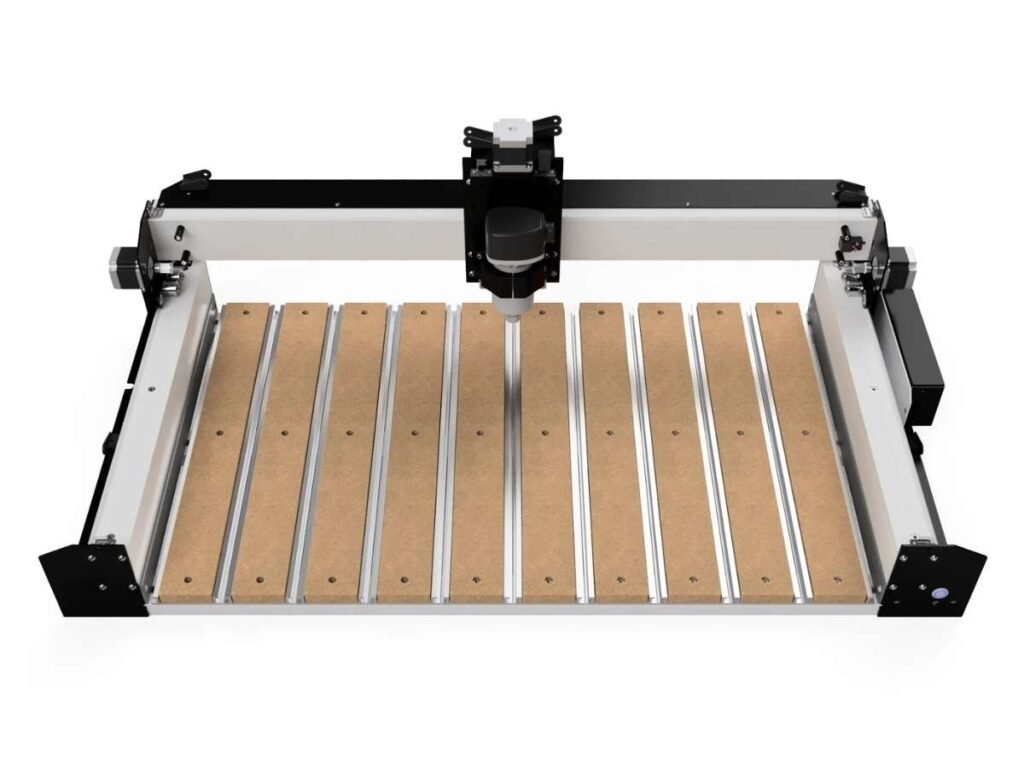
1. Shapeoko 4 by Carbide 3D
You need a CNC machine that works as hard as you do. One that won’t slow you down, throw errors mid-job, or demand constant tweaks. That’s exactly what the Shapeoko 4 delivers.
Carbide 3D took everything great about Shapeoko 3 and leveled it up—more rigidity, better accuracy, and smoother motion.
If you are new to CNC machining and entry-level engravers no longer meet your needs, Shapeoko 4 is a good CNC machine for you. It is ideal for home workshops, crafts, woodworking projects, and sign making. However, if you need continuous industrial-level engraving and cutting, this machine may not be the right option.
This isn’t a hobbyist’s machine; it’s a workhorse built for serious business. If precision, durability, and ease of use are your top priorities, this one’s worth a closer look.
Key Features
This machine isn’t just an upgrade—it’s a game-changer in its class. Here’s why:
- Heavy-Duty Frame: Thicker, more rigid rails reduce flex and improve accuracy. You’ll notice the difference in every cut.
- Belt-Driven Motion with V-Wheels: Smooth and precise, but tough enough to handle serious workloads.
- Hybrid Table: Integrated T-slots and MDF slats give you more clamping options for better workpiece stability.
- Easy Assembly: Get up and running without the headache of complex setups.
- Carbide Create Software: Intuitive, easy to learn, and designed to keep you in control of your designs.
Pros & Cons
Pros:
- Incredibly Rigid: Holds tight tolerances, even on demanding jobs.
- Built to Last: No flimsy components, just solid engineering.
- Great for Wood, Plastics, and Aluminum: Versatile enough for business use.
- Easy to Upgrade: Add a spindle, dust collection, or other enhancements.
Cons:
- Not the Cheapest: You’re paying for quality, but it’s a solid investment.
- Belts Instead of Ball Screws: Works well, but not as robust for heavy milling.
Pricing & Availability
The Shapeoko 4 starts around $1,700 to $2,300, depending on the size and add-ons. Available directly from Carbide 3D and select CNC retailers.
2. X-Carve by Inventables
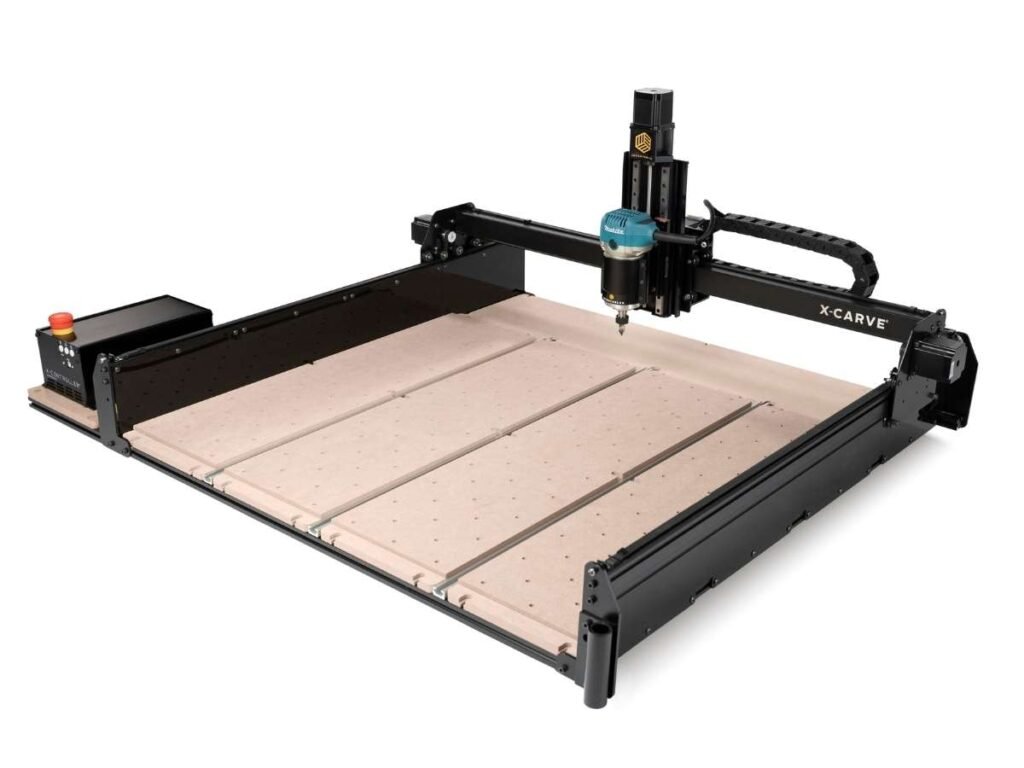
Not every CNC machine gives you the flexibility to scale. Some lock you into limitations—fixed capabilities, limited upgrades, and frustrating restrictions. X-Carve doesn’t.
Inventables designed the X-Carve for businesses that need customization and control. Whether you’re carving intricate designs into wood or cutting aluminum, this machine adapts to your workflow. It’s not just a CNC—it’s a tool that evolves with you.
This CNC machine is a great choice for creative makers and small home businesses. With customizable work area options, upgrade paths, and Easel software, it is suitable for beginners and users who plan to expand their capabilities in the future.
If your business thrives on precision, adaptability, and creative freedom, this might be the machine you’ve been looking for.
Key Features
Some CNC machines give you raw power. Others give you ease of use. The X-Carve? It delivers both.
- Customizable Work Area: Available in different sizes, so you get exactly what you need.
- Upgradable Spindle: Start with the standard spindle or upgrade to a more powerful one as your business grows.
- Makita Router Compatible: You’re not locked into a proprietary spindle—more flexibility, more cutting power.
- Fully Open-Source Design: Modify, expand, or tweak components to fit your specific workflow.
- Easel Software Included: Designed for business owners, not just engineers—intuitive, web-based, and feature-rich.
Pros & Cons
Pros:
- Highly customizable: You control the size, spindle, and upgrades.
- Great for precision carving: Excellent for detailed work on wood, plastics, and soft metals.
- Strong online community: Tons of resources, support, and real-world advice.
- Web-based software: No installation headaches—just log in and start working.
Cons:
- Assembly takes time: Be ready for a multi-hour setup process.
- Belts require occasional maintenance: Unlike lead screws, belts can stretch over time.
- Stock spindle is underpowered: If you’re cutting hard materials, you’ll want an upgrade.
Pricing & Availability
The X-Carve starts at around $2,000 for the base model, but pricing varies depending on the upgrades and accessories you choose. Available directly from Inventables.
3. Blue Elephant’s 1212 Desktop Small CNC Router Machine
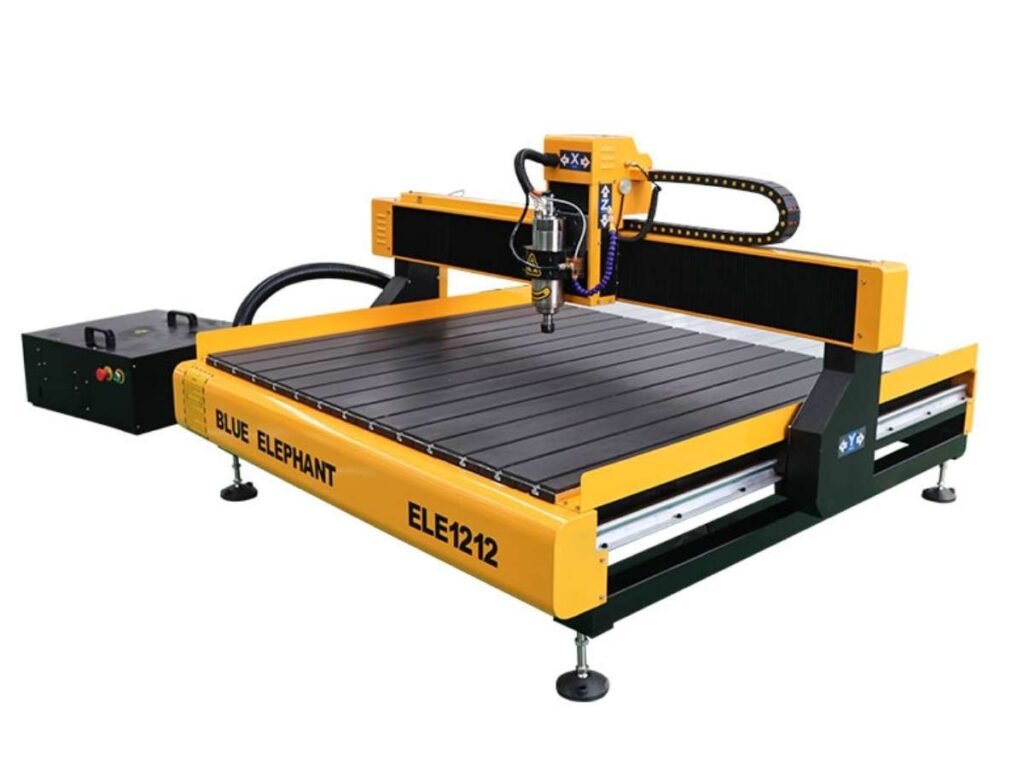
I remember the first time I powered up the Blue Elephant 1212 Desktop wood CNC machine for home use. It The hum of the spindle, the smooth glide of the axes—it was clear this machine was built for precision and reliability.
This CNC router is suitable for home workshops and small businesses that require high precision but have limited workspace. It is the best CNC machine for woodworking. Besides, It can handle cabinet component production, acrylic processing, and small-batch production tasks with ease.
For businesses like yours, where accuracy and efficiency are paramount, the 1212 offers a compact solution without compromising on performance.
Key Features
This machine is designed to meet the rigorous demands of professional workshops:
- Robust Construction: Built with an integral cast iron frame, ensuring durability and stability during operations.
- High-Precision Spindle: Equipped with a 2.2kW air-cooled spindle, capable of reaching speeds up to 18,000 RPM, allowing for detailed and efficient cutting.
- Advanced Control System: Utilizes the user-friendly Mach3 control system, simplifying the operation process.
- Compact Work Area: Features a 1200x1200mm (4×4 feet) worktable, ideal for businesses with limited space but high demands for precision.
- Versatile Application: Suitable for processing various materials, including wood, acrylic, PVC, and more, making it adaptable to diverse project requirements.
Pros & Cons
Pros:
- Durable Build: The sturdy construction minimizes vibrations, enhancing cutting accuracy.
- User-Friendly Interface: The Mach3 system offers an intuitive experience, reducing the learning curve.
- Space-Efficient Design: Its compact footprint is perfect for workshops where space is at a premium.
- Material Versatility: Handles a wide range of materials, broadening your service offerings.
Cons:
- Assembly Required: Initial setup can be time-consuming; ensure your team allocates adequate time for assembly and calibration.
Pricing & Availability
The Blue Elephant 1212 small CNC machine for home use is competitively priced between $5,500 to $8,000, depending on selected configurations and optional features. For the most accurate and current pricing, it’s recommended to contact Blue Elephant directly or consult authorized distributors.
4. BobsCNC Evolution 4
Embarking on my CNC journey, I sought a machine that combined precision with a touch of traditional craftsmanship. The BobsCNC Evolution 4 stood out, not just as a tool, but as a testament to thoughtful design and functionality.
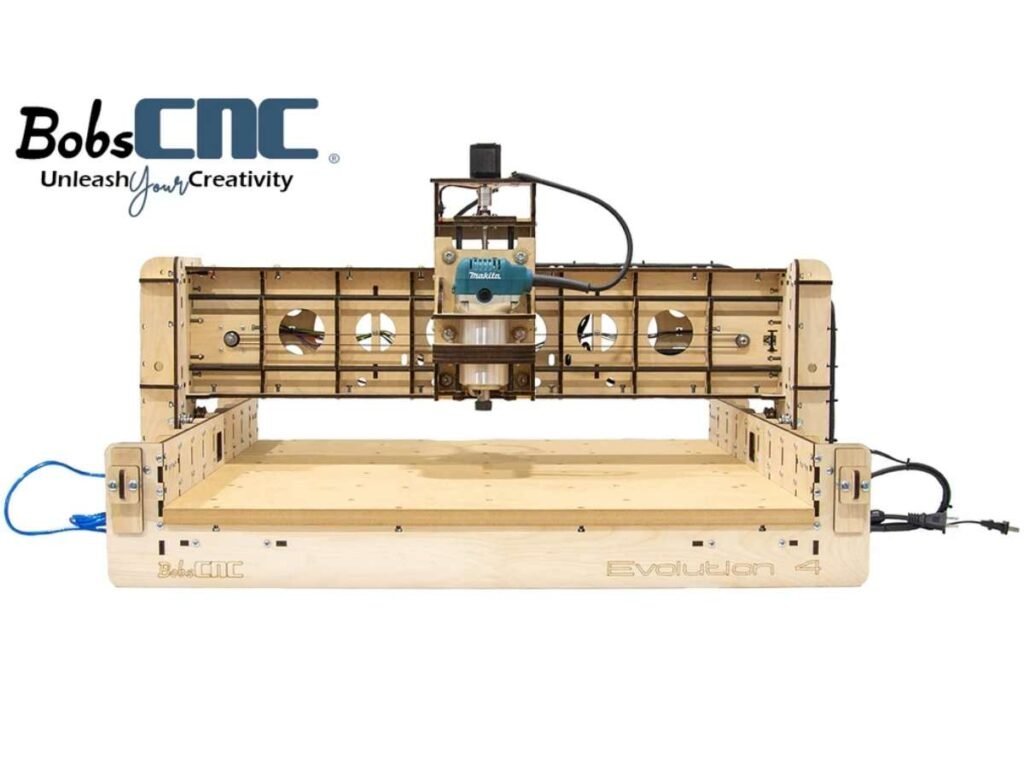
Its wooden frame, reminiscent of classic woodworking, intrigued me. This machine isn’t just about cutting materials; it’s about crafting experiences.
BobsCNC Evolution 4 is a budget CNC machine suitable for budget-conscious beginners who enjoy DIY projects. It provides an ideal learning platform for CNC woodworking while delivering reliable machining quality. However, if you need higher accuracy and faster cutting speeds, you should consider a CNC router with a more rigid structure.
Key Features
- Spacious Cutting Area: With a 24″ x 24″ x 3.3″ cutting space, it accommodates a variety of projects, from intricate designs to larger pieces.
- Laser-Cut Wooden Frame: Crafted from durable Baltic birch, the frame not only provides stability but also adds an aesthetic appeal to your workspace.
- SG20U Supported Rail System: Ensures smooth and precise movements, enhancing the quality of your cuts.
- NEMA 17 Stepper Motors: Reliable motors that deliver consistent performance, crucial for detailed work.
- Arduino-Based Microprocessor: Offers flexibility and is compatible with various software, allowing for customization to suit your specific needs.
Pros & Cons
Pros:
- Affordable Entry Point: Ideal for small businesses or hobbyists seeking quality without a hefty price tag.
- Engaging Assembly Process: Building the machine provides valuable insights into its operation, fostering a deeper connection with your work.
- Active Community Support: A vibrant user community offers shared experiences, tips, and troubleshooting advice.
Cons:
- Assembly Time: Requires patience and precision during setup; not a plug-and-play device.
- Wooden Frame Considerations: While sturdy, wooden construction may be susceptible to environmental factors like humidity.
- Learning Curve: New users might face challenges in mastering the software and achieving optimal results.
Pricing & Availability
The BobsCNC Evolution 4 is competitively priced, making it accessible for many enthusiasts and professionals. For the most current pricing and availability, it’s advisable to visit the official BobsCNC website or authorized retailers.
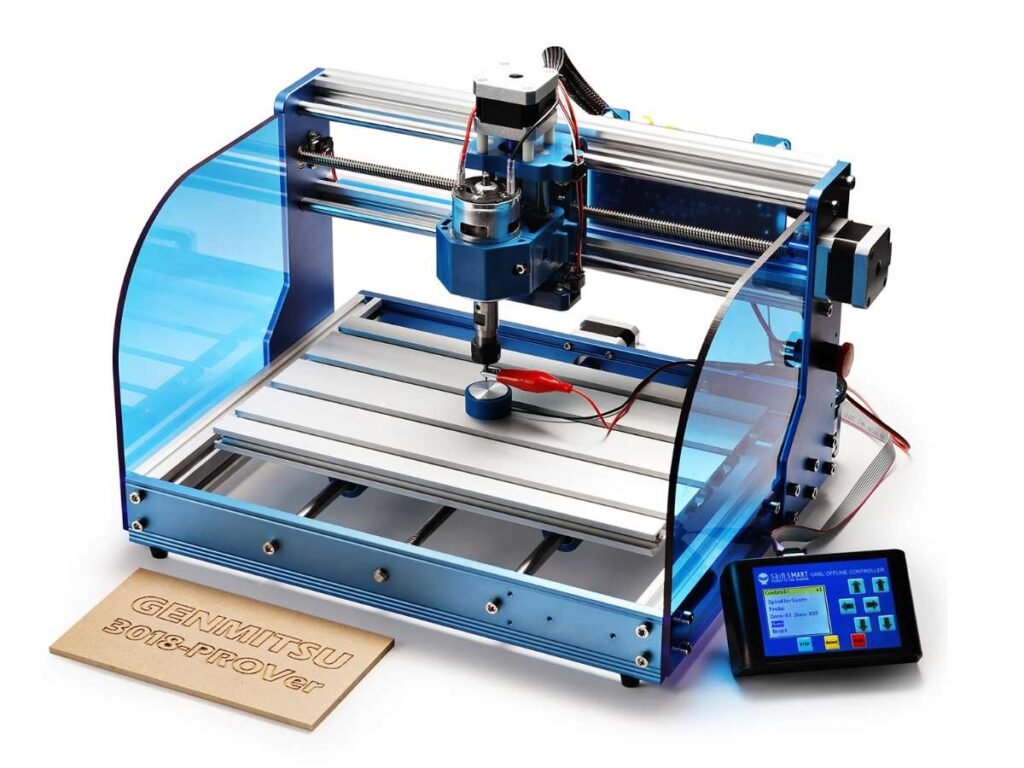
5. SainSmart Genmitsu 3018-PROVer
I still remember the first time I unboxed the SainSmart Genmitsu 3018-PROVer. Its compact design belied the potential it held. This machine isn’t just a tool; it’s an invitation to bring intricate designs to life, whether you’re a seasoned professional or a passionate hobbyist.
The SainSmart 3018-PROVer is an affordable CNC machine that is ideal for hobbyists who want to learn engraving and basic CNC operation at a low cost. It can be used for small pattern engraving, PCB projects, and small craft projects. However, its working area and spindle power are limited, so it is not suitable for large woodworking projects.
Key Features
- Sturdy Construction: Built with an aluminum frame, the 3018-PROVer ensures durability and stability, minimizing vibrations during operation.
- High-Speed Spindle: Equipped with a 775 motor capable of reaching speeds up to 10,000 RPM, it efficiently handles various materials, from wood to soft metals.
- User-Friendly Interface: The machine comes with an offline controller, allowing for straightforward operation without the need for a computer connection.
- Safety Features: Integrated limit switches and an emergency stop button provide an added layer of safety during operations.
- Versatile Software Compatibility: Compatible with GRBL control software, it offers flexibility in design and execution.
Pros & Cons
Pros:
- Compact Footprint: Ideal for workshops with limited space, the 3018-PROVer doesn’t compromise on functionality.
- Cost-Effective: Offers a balance between affordability and feature set, making it accessible to a wide range of users.
- Community Support: A robust online community provides resources, support, and inspiration for projects.
Cons:
- Assembly Required: While semi-assembled, some setup is necessary, which might be a consideration for those seeking a plug-and-play solution.
- Limited Cutting Area: With an effective engraving area of 260 x 155 x 35mm, it may not be suitable for larger projects.
- Spindle Power: The standard spindle may struggle with harder materials, potentially requiring upgrades for specific applications.
Pricing & Availability
The 3018-PROVer is competitively priced, typically around $349, offering a cost-effective entry into CNC machining. It’s available through SainSmart’s official website and authorized retailers.
6. Maslow CNC
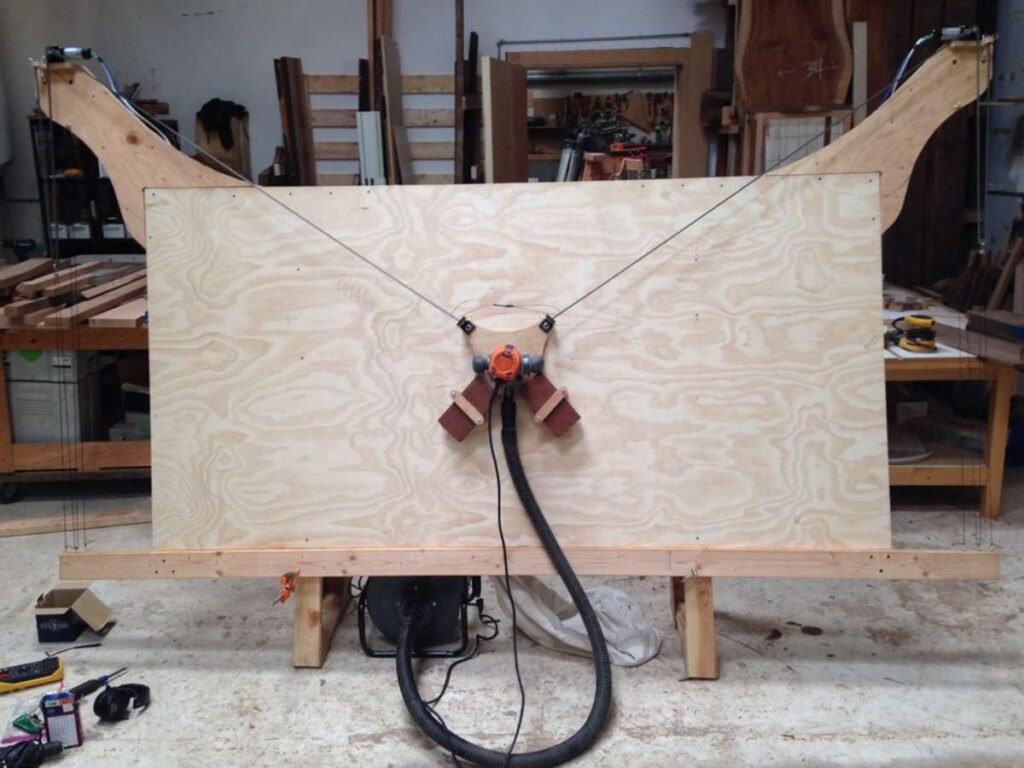
Imagine having the capability to craft full-scale designs without the hefty price tag of traditional CNC machines. The Maslow CNC makes this possible, offering a unique, cost-effective solution for large-format cutting needs.
In addition, if you need large-size cutting but have limited workshop space, the vertical design of the Maslow CNC can effectively solve this problem. The only drawback is that it requires more assembly and calibration work during the initial setup.
Key Features
- Expansive Cutting Area: Boasting a 4×8-foot workspace, it accommodates sizable projects, ideal for businesses and DIY enthusiasts alike.
- Vertical Design: Its upright orientation saves valuable floor space, making it suitable for various workshop environments.
- Open-Source Accessibility: As an open-source project, users can customize and improve the machine, fostering a collaborative community.
- Affordable Entry Point: With kits starting around $500, it democratizes access to CNC technology.
Pros & Cons
Pros:
- Cost-Effective: Provides large-scale CNC capabilities at a fraction of the cost of traditional machines.
- Community Support: A vibrant user base offers shared resources, modifications, and troubleshooting assistance.
- Space Efficiency: The vertical setup maximizes workspace utilization.
Cons:
- Assembly Required: Users must construct the frame and assemble components, which can be time-consuming.
- Speed Limitations: With cutting speeds around 31 inches per minute, it’s slower compared to higher-end models.
- Accuracy Considerations: Achieving precise cuts depends heavily on meticulous calibration and setup.
Pricing & Availability
Starting at approximately $500, the Maslow CNC is available through various resellers. Additional costs may include materials for the frame and a compatible router.
7. Onefinity CNC Woodworker
Imagine a CNC machine that not only meets the demands of your projects but also inspires innovation. The Onefinity CNC Woodworker is designed to transform your creative visions into reality, offering both professionals and hobbyists a reliable and versatile platform.
Onefinity CNC stands out for its high precision and ease of use. It is easy to install and delivers accurate machining, making it ideal for woodworking, sign making, and other detailed engraving projects. If you are looking for future upgrade options, Onefinity CNC can also meet your needs.
Key Features
- Robust Construction: Built with high-quality materials, ensuring durability and stability for precise operations.
- Generous Cutting Area: Features a 32″ x 32″ cutting space, accommodating a wide range of project sizes.
- User-Friendly Interface: Equipped with an intuitive touch display and compatible with various software, making it accessible for users at all levels.
- Versatile Material Compatibility: Capable of handling wood, plastics, and soft metals, expanding your creative possibilities.
- Community Support: Backed by an active user community, providing resources, support, and shared experiences.
Pros & Cons: Weighing the Benefits
Pros:
- Easy Assembly: Designed for straightforward setup, minimizing downtime and allowing you to focus on your projects.
- High Precision: Delivers accurate cuts, enhancing the quality of your work.
- Expandability: Offers options for upgrades, allowing the machine to grow with your needs.
Cons:
- Additional Components Needed: Requires purchasing a router and workbed separately, which may increase initial setup time and cost.
- Learning Curve: While user-friendly, mastering the machine’s full potential may require time and practice.
Pricing & Availability
The Onefinity CNC Woodworker is competitively priced, with the X-35 version starting around $1,564 and the X-50 version approximately $1,947, excluding the controller and interface.

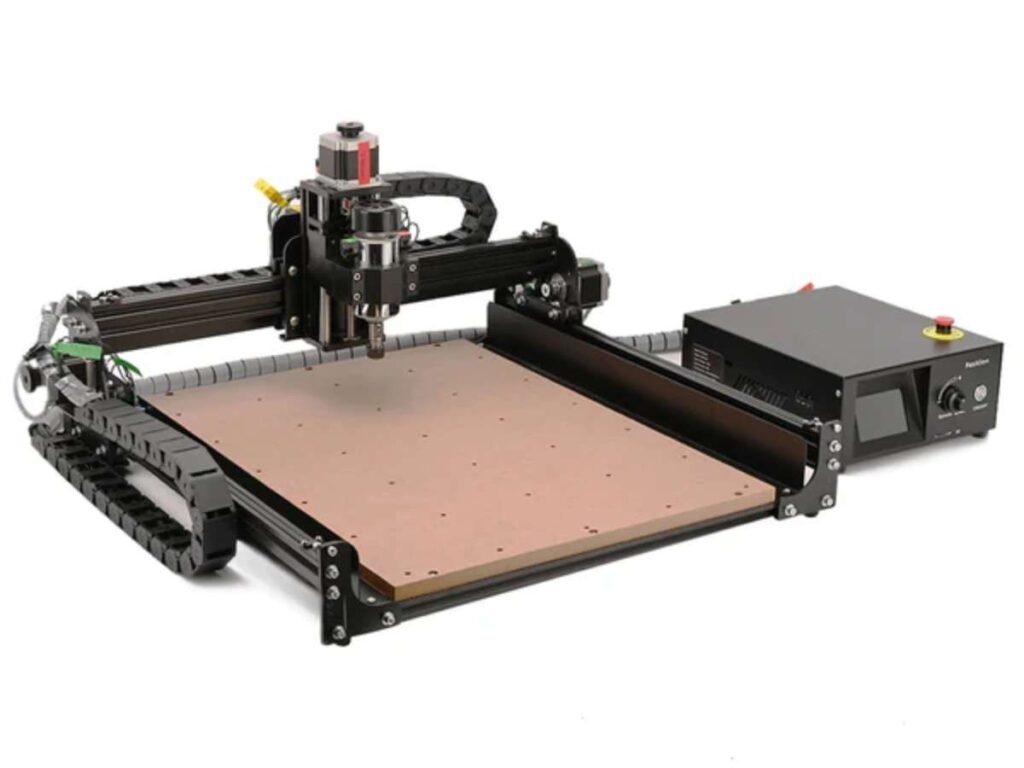
8. FoxAlien CNC 4040-XE
When I first powered up the FoxAlien CNC 4040-XE, I was immediately impressed by its robust build and precise capabilities. This machine isn’t just a tool; it’s a gateway to bringing intricate designs to life, whether you’re a seasoned professional or a passionate hobbyist.
It meets the needs of users who require a compact machine size while also providing stable cutting performance. For users with limited workspace, the FoxAlien CNC 4040-XE is a practical and efficient choice.
Key Features
- Generous Engraving Area: With a working space of 15.75” x 15.75” x 2.56” (400 x 400 x 65mm), it accommodates a wide range of project sizes.
- Powerful 300W Spindle: The high-speed spindle ensures clean and accurate cuts through various materials, enhancing the quality of your work.
- Sturdy Construction: Built with durable materials, the 4040-XE offers stability and longevity, making it a reliable addition to any workshop.
- User-Friendly Interface: Compatible with GRBL-control software, it simplifies the process from design to execution, allowing you to focus on creativity.
- Versatile Material Compatibility: Capable of handling wood, acrylic, MDF, and more, it opens up a world of possibilities for your projects.
Pros & Cons
Pros:
- High Precision: The 4040-XE delivers detailed and accurate engravings, elevating the quality of your creations.
- Compact Design: Its size is ideal for workshops with limited space, offering functionality without a large footprint.
- Community Support: An active user community provides resources, support, and inspiration, making your CNC journey more enjoyable.
Cons:
- Assembly Required: While the main parts are pre-assembled, some setup is necessary, which might be a consideration for those seeking a plug-and-play solution.
- Learning Curve: New users might face challenges in mastering the software and achieving optimal results, but with patience and practice, proficiency is attainable.
Pricing & Availability
The 4040-XE is competitively priced, offering a cost-effective entry into CNC machining. It’s available through FoxAlien’s official website and authorized retailers.
9. Snapmaker 2.0 (A350T or A250T)
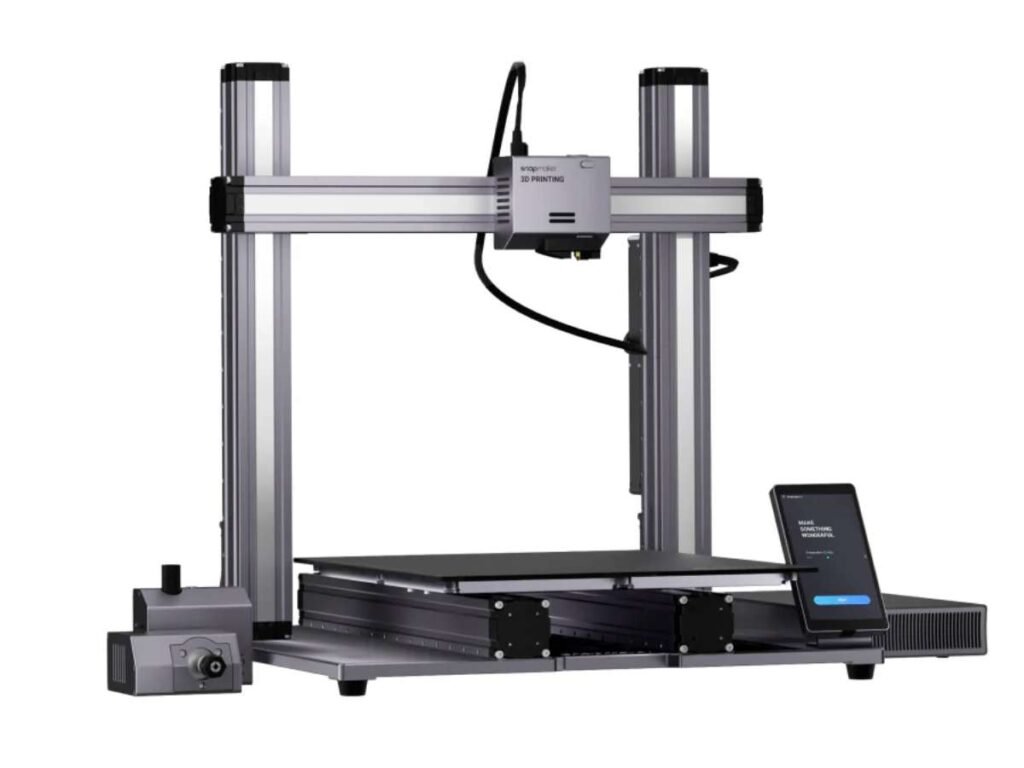
Imagine a single machine that brings together the capabilities of 3D printing, laser engraving, and CNC carving. The Snapmaker 2.0 series, featuring the A350T and A250T models, does just that. Designed for both businesses and creative enthusiasts, this modular 3-in-1 printer opens up a world of possibilities.
This design not only saves workspace but also allows users to explore different manufacturing processes. However, if your main focus is CNC woodworking, a dedicated CNC router is still a better choice.
Key Features
- Versatile Functionality: Seamlessly switch between 3D printing, laser engraving, and CNC carving, all within one compact device.
- Generous Work Area: The A350T offers a work area of 320 x 350 x 330 mm, while the A250T provides 230 x 250 x 235 mm, accommodating various project sizes.
- User-Friendly Interface: Equipped with a 5-inch touchscreen running on Android OS, it ensures intuitive operation and control.
- High-Quality Construction: Crafted with an all-metal design, the Snapmaker 2.0 ensures durability and precision in every task.
- Customizable and Expandable: With over 10 modules and add-ons available, tailor the machine to fit your specific needs and expand its capabilities.
Pros & Cons
Pros:
- Multi-Functionality: Combines three distinct fabrication methods, reducing the need for multiple machines.
- Robust Community Support: An active user base offers shared experiences, tutorials, and troubleshooting advice.
- Space-Saving Design: Ideal for workshops with limited space, consolidating multiple tools into one footprint.
Cons:
- Setup and Calibration: Transitioning between functions requires reconfiguration, which may be time-consuming.
- Learning Curve: Mastering all three functionalities may require time and practice, especially for beginners.
- Noise Levels: Operations can be noisy; using an enclosure is recommended to mitigate sound.
Pricing & Availability
The Snapmaker 2.0 A350T is priced at approximately $1,599, offering a comprehensive 3-in-1 solution. For the most current pricing and availability, visit the official Snapmaker website or authorized retailers.
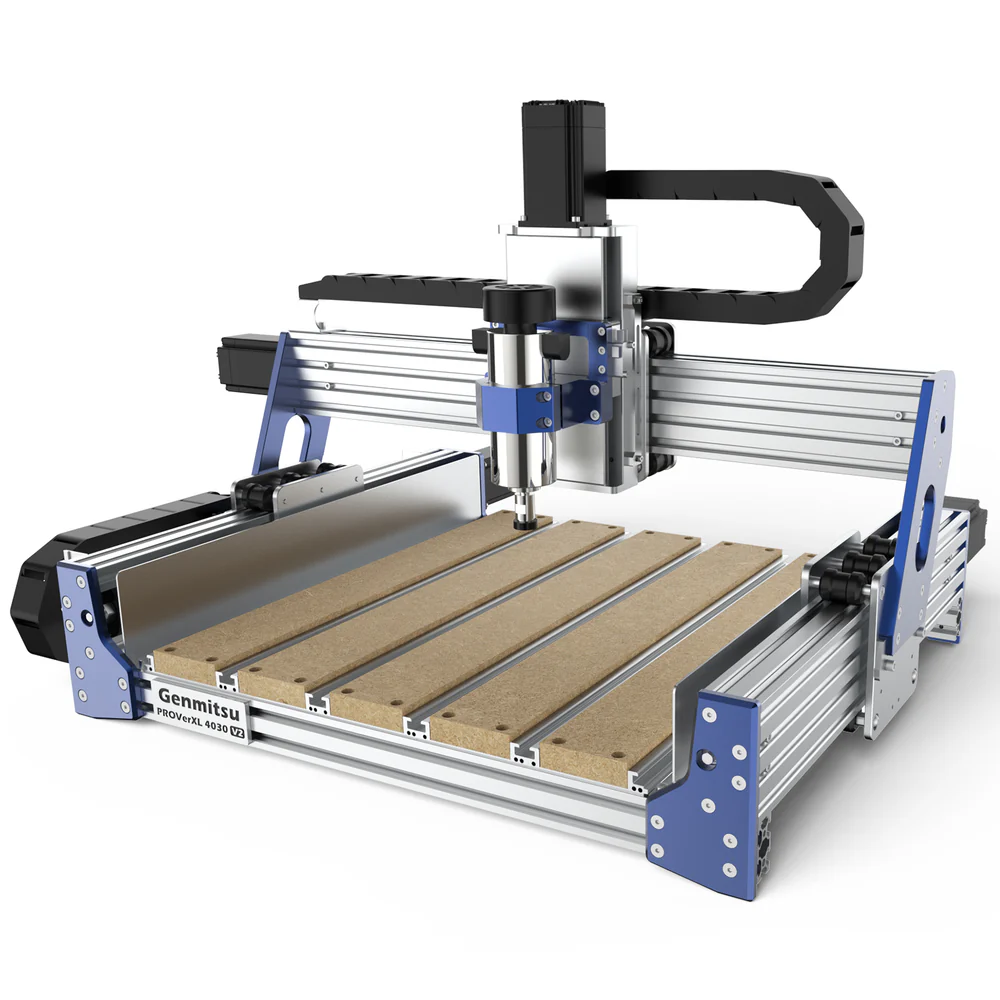
10. SainSmart Genmitsu PROVerXL 4030 V2 CNC Router
If the SainSmart 3018 series doesn’t meet your machining needs, consider this home-use CNC machine. It represents a comprehensive upgrade over entry-level models, catering to both beginners and those looking to upgrade their equipment. It offers improved precision and machining efficiency, boasting a feed rate of up to 5,000 mm/min—sufficient to meet your operational requirements.
Key Features
- Upgraded Closed-Loop Motors and Ball Screws: These upgrades eliminate the issue of lost steps. Closed-loop motors minimize noise, while ball screws ensure higher machining precision. Additionally, the machine features adjustable eccentric nuts on the rollers for enhanced flexibility.
- Multi-Material Machining: The hybrid T-slot bed securely holds workpieces, enabling precise cutting and engraving on various materials such as wood, plastic, and soft metals.
- Small-to-Medium Project Capacity: With a working area of 400mm x 300mm x 110mm, it is ideal for small-to-medium projects; for larger dimensions, a professional-grade machine with a bigger work area would be required.
- Software Upgrades: Powered by a GRBL-based control board, the machine is easily operated via USB using software such as Candle or Universal Gcode Sender.
- Rotary Axis Customization: Beyond the standard features, you can add an optional rotary module to enable 360° engraving and rotary 3D/2D designs, allowing you to tackle projects that standard 3-axis CNC machines cannot handle.
Pros & Cons
Pros
- Larger Workspace: Compared to the 3018 desktop series, the SainSmart 4030 offers a larger machining area. This provides greater flexibility, allowing you to handle both small-scale work and larger panels.
- Great Value: Although priced higher than the 3018, the added features strike an excellent balance between cost and capability, offering great value for money.
- Facilitates future upgrades: If you have future needs such as rotary machining, this machine can be upgraded to meet your specific requirements, thereby reducing your initial equipment investment.
- Higher efficiency: Within the class of home-use engraving machines, this model offers a distinct advantage in processing speed, allowing for greater efficiency when performing the same tasks.
Cons
- Despite its larger size, it is suitable only for light-duty tasks and not for high-intensity, heavy-load continuous industrial production.
- Initial training is required to get up and running, covering aspects such as machine operation and software usage.
- It has limitations when handling challenging materials due to its limited spindle power; if you require high-power machining capabilities, a professional-grade industrial engraver is recommended.
- It requires significant effort to maintain over time.
Pricing & Availability
The official price of the Genmitsu PROVerXL 4030 V2 is $1,249; however, this applies only to the base configuration. If you wish to purchase accessories such as a spindle motor, acrylic dust enclosure, or offline controller, the total cost rises to $1,503.
FAQ
1. What software is used with a household CNC machine?
A home CNC machine requires CAD/CAM software, and control software. Common CAD/CAM software options include Fusion 360, FreeCAD, Aspire, VCarve Pro, and Carveco Maker, while control software includes Candle (GrblControl) and Mach3. The process begins with CAD software for 2D or 3D design; CAM software then converts these designs into G-code that the machine can interpret; finally, control software operates the machine tool to perform the CNC machining. This constitutes the complete CNC machining workflow.
2. What size CNC machine is best for a home workshop?
CNC machines for home use fall into the category of small-scale CNC equipment, yet they range from compact desktop models to larger hobby CNC machines; you should select the size that best suits your specific machining requirements.
If your projects involve very small dimensions—such as crafting small ornaments or making compact signs—a small desktop CNC machine (e.g., 300mm × 300mm or 600mm × 900mm) will suffice, meeting your needs without incurring unnecessary costs. However, if you plan to machine slightly larger workpieces, such as small cabinet doors or wooden shop signs, a 1200mm × 1200mm hobbyist CNC machine would be the appropriate choice.
3. Is buying a CNC machine worth it for home projects?
It is worth it. If you frequently undertake woodworking projects or plan to set up a small home workshop to generate income, a CNC machine is essential. Although there is an initial investment, it will significantly boost your efficiency and reduce your workload, allowing you to recoup the cost quickly. However, if you only work on projects occasionally, a home CNC machine is not necessary.
4. Do I need CNC experience to use a CNC router at home?
No, it is not necessary. Home CNC machines are very simple to operate; even without prior CNC experience, you can quickly get up to speed. Desktop engraving machines, for instance, typically come with a user manual that allows you to start using them right away. Larger home CNC machines may require some basic training, but you can quickly master their operation through learning.
5. What is the difference between a desktop CNC machine and an industrial CNC machine?
The primary differences between desktop CNC machines and industrial CNC machines lie in machining dimensions, production scale, machining precision, and application scenarios.
Regarding machining dimensions, desktop CNC machines have a limited working area, whereas industrial CNC machines can handle large-scale machining with customizable dimensions.
In terms of production scale, desktop CNC machines are suited for small-batch production in small workshops, while industrial-grade CNC machines support mass production, capable of processing thousands of sheets per day.
Regarding precision, industrial-grade CNC machines feature rigid structural frames that effectively dampen vibration, resulting in superior machining accuracy compared to desktop models.
Industrial CNC machines also offer a wider range of application scenarios than their desktop counterparts.
Conclusion
That first CNC machine I bought? A nightmare. But it led me here to a place of smarter decisions and better machines.
Now, you have the knowledge to make the right choice, too.
We broke down the top CNC machines for business, highlighting the best models, their pros and cons, and key features. No more guesswork.
So, what’s your next move? Will you invest in a machine that helps your business grow? Or risk trial and error?
While choosing the right CNC machine is essential, many manufacturers also rely on custom cable assembly to streamline production and reduce assembly time.
Don’t wait. Get the right CNC machine now.
Recommended Reads for You
Need more ideas? Browse through our extended range of products and discover something new:
If you enjoyed this read, here are a few more articles packed with helpful information:
Still haven’t found what you’re looking for? Don’t hesitate to contact us. We’re available around the clock to assist you.